Typically, when it comes to cybersecurity, there is a playoff between convenience and security. Nobody enjoys remembering (multiple unique) passwords, inputting two-factor authentication, or being limited to what programs they can use on their work laptops because of a “security policy”. What it boils down to, is the more convenient something is, the less secure that thing becomes.
A secure password has been generally agreed to be 10-14 characters in length, including numbers and special characters. However, most people can only easily remember 6-8 characters and this becomes easily bruteforceable.
Here are typical passwords policies applied in an enterprise environments:
• minimum of 8-character length
• use special characters *($%@
• periodic password resets
• don’t use common passwords
• use multi-factor authentication
• don’t re-use old passwords
• apply a password expiry date
• don’t use personal passwords in a work environment
• use unique passwords across accounts
This makes things unnecessarily complicated and IT departments are often inundated with password recovery requests. Fortunately, the days of long, complex passwords are disappearing.
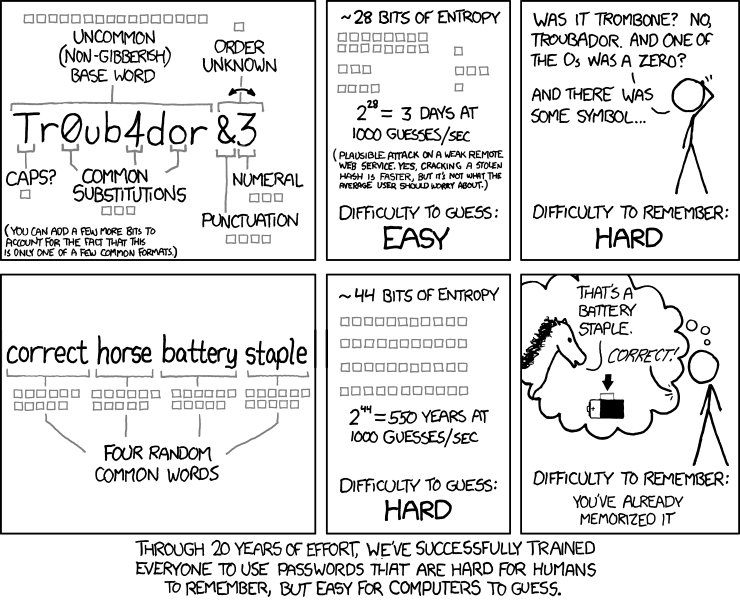
Passphrases
The key to a good password is to make it as long as possible and as memorable as possible. Introducing passphrases: a strong password using a short sentence or group of random words. Here is an excellent explanation by an xkcd comic:

Password Managers
Best practice is having a unique password for every account. If a bad actor compromises your one password that you use for all your accounts, then all of your accounts have been compromised; the risk is far too great. If you want to know if your password has been leaked, go to haveibeenpwned.com to find out if and when this might have happened. How then, can we remember multiple, unique, high-entropy passwords? By using a password manager.
Password managers securely store passwords in an encrypted vault. Only one “master” password needs to be remembered to access the other passwords in the vault. The password manager can automatically fetch your password whenever you need them and fills them into websites for you. Other common features include, warning you when you reuse passwords, informing when passwords may have been compromised (by checking the hash value) and including a password generator that creates high entropy passwords for you to use.
 fscyber.co